
- What Does It Mean When a Workstation Causes Chronic Pain?
- Persistent Neck Pain That Gets Worse During Work
- Frequent Headaches During or After Work Hours
- Shoulder Pain That Appears Without Injury
- Lower Back Pain That Improves When You Leave Your Desk
- Wrist and Hand Discomfort During Computer Use
- You Feel Stiff Every Morning Despite Sleeping Well
- Tingling, Numbness, or Burning Sensations
- Your Posture Continues to Collapse Throughout the Day
- Pain Improves During Vacations or Weekends
- Common Ergonomic Mistakes That Lead to Chronic Pain
- Is Your Work-From-Home Setup Making Things Worse?
- How to Know If Your Workstation Is Causing Pain
- How to Fix an Ergonomic Workstation
- Preventing Chronic Pain Before It Starts
Millions of people spend most of their day at a desk without realizing that their workstation may be contributing to ongoing aches and discomfort. What often starts as mild stiffness in the neck, shoulders, back, or wrists can gradually develop into persistent pain that affects productivity, sleep quality, and overall well-being. The problem is that many workers assume pain is a normal part of aging or office work. In reality, poor workstation ergonomics are one of the most common causes of preventable musculoskeletal problems. Whether you work in an office or from home, recognizing the signs your workstation is causing chronic pain can help you make adjustments before the discomfort becomes a long-term issue. This guide explains the warning signs, common ergonomic mistakes, and practical solutions to create a healthier workspace.
What Does It Mean When a Workstation Causes Chronic Pain?
A workstation causes chronic pain when its design, layout, or setup places repeated stress on muscles, joints, tendons, and nerves over an extended period. Common examples include:
- A monitor positioned too low or too high
- A chair that doesn't support the lower back
- A keyboard placed too far away
- Poor posture from desk setup habits
- Prolonged sitting without movement
Over time, these factors can contribute to chronic pain from office workstation use and increase the risk of repetitive strain injuries.
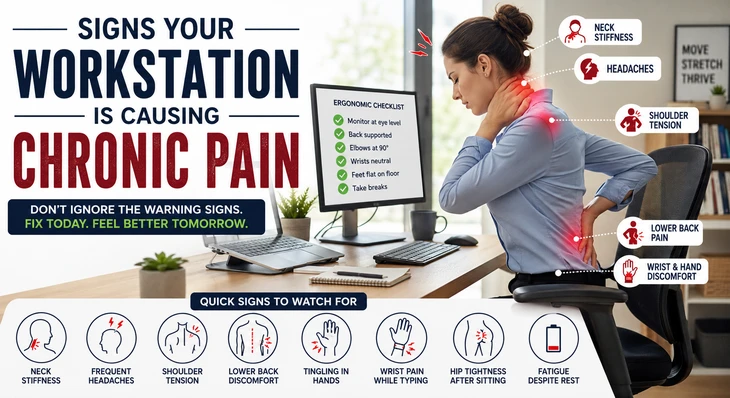
Quick Signs to Watch For
If you regularly experience any of the following, your workstation may be the cause:
- Neck stiffness after work
- Frequent headaches
- Shoulder tension
- Lower back discomfort
- Tingling in the hands or fingers
- Wrist pain while typing
- Hip tightness after sitting
- Fatigue despite minimal physical activity
Persistent Neck Pain That Gets Worse During Work
One of the clearest signs your desk setup is causing pain is recurring neck discomfort that intensifies throughout the workday. When your monitor is too low, you spend hours looking downward. This posture increases the load on the cervical spine and surrounding muscles.
Signs of a workstation causing neck and back pain include:
- Neck stiffness every afternoon
- Difficulty turning your head
- Pain between the neck and shoulders
- Soreness after video meetings
Many people mistakenly blame stress when their workstation setup is actually responsible.
How to Fix It
- Position the top of the monitor at eye level
- Keep the screen approximately an arm's length away
- Avoid looking down at a laptop for long periods
- Use a laptop stand with an external keyboard
Frequent Headaches During or After Work Hours
A desk job causing neck pain and headaches is surprisingly common. Poor screen positioning and sustained muscle tension can create strain in the neck and upper shoulders, which may trigger tension headaches.
Common headache-related ergonomic issues
- Monitor positioned off-center
- Forward head posture
- Excessive screen glare
- Squinting due to poor lighting
If headaches consistently improve on weekends or vacations, workstation ergonomics may be a major contributing factor.
Shoulder Pain That Appears Without Injury
Workstation setup, causing shoulder pain, often develops gradually. Many employees unconsciously elevate their shoulders while typing or using a mouse. Over time, this creates muscle fatigue and inflammation.
Warning signs
- Aching shoulders by the end of the day
- Tightness near the shoulder blades
- Discomfort when reaching overhead
- One shoulder is hurting more than the other
Common causes
- Armrests are set too high
- Mouse placed too far away
- Keyboard positioned incorrectly
- Lack of arm support
Adjusting arm position can significantly reduce shoulder strain.
Lower Back Pain That Improves When You Leave Your Desk
Lower back pain from poor desk ergonomics is one of the most reported office-related complaints. Sitting for prolonged periods places pressure on spinal discs and weakens postural muscles.
Signs your workstation may be responsible
- Back pain after sitting for 30–60 minutes
- Relief when standing or walking
- Difficulty maintaining an upright posture
- Frequent shifting in your chair
Many people focus only on buying a better chair. While seating matters, desk height, monitor position, and movement habits are equally important.
Better lower back support strategies
- Maintain lumbar support
- Keep feet flat on the floor
- Avoid crossing your legs for long periods
- Take movement breaks every 30–60 minutes
Wrist and Hand Discomfort During Computer Use
Wrist pain from workstation setup problems often develops slowly. Incorrect keyboard or mouse placement can place excessive pressure on tendons and nerves.
Symptoms include
- Tingling fingers
- Wrist soreness
- Hand fatigue
- Reduced grip strength
- Numbness at night
These symptoms may indicate early repetitive strain issues that should not be ignored.
Workstation improvements
- Keep wrists in a neutral position
- Avoid resting wrists on hard surfaces
- Position the mouse close to the keyboard
- Consider ergonomic input devices if needed
You Feel Stiff Every Morning Despite Sleeping Well
Many people assume morning stiffness is caused by their mattress or sleeping position. However, chronic pain from sitting at a desk all day can create muscular imbalances that persist long after work ends.
Common areas affected
- Hips
- Lower back
- Neck
- Shoulders
When muscles remain shortened or inactive for hours, the body can feel stiff even after a full night's sleep.
Tingling, Numbness, or Burning Sensations
These symptoms may signal nerve irritation related to poor workstation ergonomics. Nerves can become compressed when joints remain in awkward positions for long periods.
Areas commonly affected
- Hands
- Fingers
- Forearms
- Legs
- Feet
Ignoring these symptoms may allow minor issues to progress into more significant workstation-related repetitive strain injuries. Seek professional evaluation if symptoms become persistent or severe.
Your Posture Continues to Collapse Throughout the Day
Good posture should feel sustainable, not forced. If you constantly find yourself slouching despite trying to sit upright, your workstation may be poorly designed.
Signs of a bad ergonomic workstation
- Rounded shoulders
- Forward head posture
- Leaning toward the screen
- Constantly shifting positions
Poor posture from desk setup issues often indicates that equipment placement is forcing the body into inefficient positions.
A quick posture check
While seated:
- Ears should align roughly with shoulders
- Shoulders should remain relaxed
- Elbows should rest near 90 degrees
- Feet should remain supported
If maintaining this position feels difficult, adjustments are likely needed.
Pain Improves During Vacations or Weekends
This is one of the strongest clues that your workstation is causing chronic pain. Ask yourself:
- Do symptoms decrease when away from work?
- Do aches return within a few hours of sitting at your desk?
- Are weekends noticeably more comfortable?
If the answer is yes, workplace ergonomics deserves closer examination. Many office workstation health problems become obvious only when people compare workdays with days off.
Common Ergonomic Mistakes That Lead to Chronic Pain
Several ergonomic mistakes causing chronic pain appear harmless but create significant stress over time.
Monitor mistakes
- Screen too low
- Screen too high
- Screen positioned off-center
Chair mistakes
- No lumbar support
- Seat too high
- Seat too low
Keyboard mistakes
- Reaching forward while typing
- Excessive wrist extension
- Keyboard positioned too high
Mouse mistakes
- Reaching away from the body
- Unsupported forearm
- Excessive clicking force
Sitting mistakes
- Remaining seated for hours
- Leaning forward continuously
- Crossing legs for extended periods
Is Your Work-From-Home Setup Making Things Worse?
A work-from-home workstation causing pain is increasingly common. Many home offices were created quickly without ergonomic planning.
Common home-office problems
- Working from couches
- Dining table workstations
- Laptop-only setups
- Non-adjustable chairs
- Poor lighting
Unlike traditional offices, home environments often lack ergonomic equipment, increasing the risk of chronic pain from office workstation habits.
Home workstation upgrades that matter
- External monitor
- Adjustable chair
- Separate keyboard and mouse
- Footrest if needed
- Proper task lighting
Small investments can dramatically improve comfort.
How to Know If Your Workstation Is Causing Pain
If you're wondering how to know if your workstation is causing pain, perform this simple self-assessment.
Ask yourself these questions
- Does pain increase during work hours?
- Does discomfort improve when away from your desk?
- Are symptoms located in the neck, shoulders, wrists, or lower back?
- Do you sit for more than six hours daily?
- Have symptoms gradually worsened over months?
The more questions you answer "yes" to, the more likely your workstation is contributing to the problem.
How to Fix an Ergonomic Workstation
Learning how to fix an ergonomic workstation doesn't require expensive equipment. Start with the basics.
Monitor setup
- Top of screen at eye level
- Screen directly in front of you
- Arm 's-length viewing distance
Chair setup
- Lumbar support maintained
- Hips slightly above knees
- Feet supported
Keyboard and mouse setup
- Close to the body
- Elbows around 90 degrees
- Wrists neutral
Movement habits
- Stand every 30–60 minutes
- Stretch regularly
- Walk during breaks
- Alternate sitting and standing if possible
These adjustments can significantly reduce the computer workstation, causing musculoskeletal pain.
Preventing Chronic Pain Before It Starts
Preventing chronic pain from office work is easier than treating long-standing symptoms. The most effective strategy combines ergonomic improvements with regular movement.
Daily habits that help
- Change positions frequently
- Stretch the neck and shoulders
- Strengthen core muscles
- Take micro-breaks throughout the day
- Maintain physical activity outside work
Remember that even a perfectly designed workstation cannot replace movement. The human body is built to move, not remain seated for hours without interruption.
The Bottom Line
Recognizing the signs that your workstation is causing chronic pain can help prevent minor discomfort from becoming a long-term health issue. Persistent neck stiffness, headaches, shoulder tension, lower back pain, wrist discomfort, numbness, and poor posture are all potential indicators of poor workstation ergonomics. Whether you work in a corporate office or from home, small adjustments can have a major impact on comfort and productivity. Evaluating your desk setup, correcting ergonomic mistakes, and incorporating regular movement throughout the day are among the most effective ways to reduce chronic pain from using an office workstation and support long-term musculoskeletal health. If pain persists despite workstation improvements, consult a healthcare professional or physiotherapist for a personalized assessment and treatment plan.