
- The Short Answer: Why Pain Can Continue Despite an Ergonomic Chair
- Why Ergonomic Chairs Do Not Automatically Fix Bad Posture
- Common Ergonomic Chair Setup Mistakes
- Why Your Lower Back May Hurt More After Switching Chairs
- Why Neck and Shoulder Pain Can Continue
- The Hidden Problem: Sitting Too Long
- How to Sit Properly in an Ergonomic Chair
- Ergonomic Chair Posture Correction Mistakes Most People Make
- Proper Ergonomic Chair Setup for Desk Work
- When an Ergonomic Chair Is Not Enough
- Ergonomic Chair Adjustments for Back Pain Relief
- How to Improve Posture Beyond an Ergonomic Chair
- Warning Signs That Your Workstation Needs Attention
- The Real Role of an Ergonomic Chair
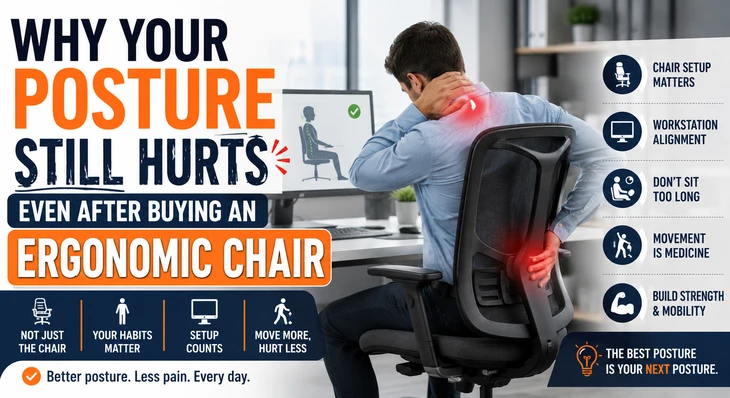
Why Your Posture Still Hurts Even After Buying an Ergonomic Chair Many people invest in an ergonomic chair expecting immediate relief from back pain, neck stiffness, and poor posture. Marketing often suggests that a high-quality chair can resolve years of discomfort. However, many office workers discover that their posture still hurts even after buying an ergonomic chair. If you've ever wondered why your back hurts in an ergonomic chair or why your discomfort continues despite spending money on better seating, you're not alone. The reality is simple: an ergonomic chair is a tool, not a complete solution. Even the most advanced chair cannot correct every posture habit, workstation problem, or movement deficiency. In many cases, the chair is not the problem—the way it's adjusted and used is. Understanding why your posture still hurts even after buying an ergonomic chair can help you identify the real causes of discomfort and finally make meaningful improvements.
The Short Answer: Why Pain Can Continue Despite an Ergonomic Chair
An ergonomic chair can support healthy posture, but it cannot:
- Fix weak muscles
- Reverse years of poor posture habits
- Correct an improperly set-up workstation
- Prevent prolonged sitting
- Eliminate movement-related stiffness
- Solve underlying spinal or joint conditions
This explains why ergonomic chairs not helping with posture pain is one of the most common complaints among office workers. Many people buy a better chair but continue using the same unhealthy sitting habits that caused discomfort in the first place.
Why Ergonomic Chairs Do Not Automatically Fix Bad Posture
One of the biggest misconceptions is that sitting in an ergonomic chair automatically improves posture. In reality, people can maintain poor posture in almost any chair. Common examples include:
- Slouching forward toward the screen
- Leaning heavily to one side
- Sitting on the edge of the seat
- Crossing legs for extended periods
- Looking down at a laptop
- Hunching shoulders while typing
This is one of the primary reasons why ergonomic chairs do not fix bad posture on their own. The chair provides support, but your body position still matters.
Signs Your Sitting Habits Are the Real Problem
You may have posture-related habits if you notice:
- Pain increases later in the day
- Frequent slouching
- Rounded shoulders
- Forward head posture
- Tight hips
- Neck strain while working
These sitting posture problems with ergonomic chairs often result from behavior rather than equipment failure.
Common Ergonomic Chair Setup Mistakes
Many users never adjust their chairs correctly after purchasing them. As a result, they experience lower back pain despite using an ergonomic chair. Some of the most common ergonomic chair setup mistakes include:
Seat Height Is Incorrect
Your feet should rest flat on the floor. Problems occur when:
- Knees are higher than the hips
- Feet dangle
- The seat is too low
- The seat is too high
Improper seat height can increase pressure on the lower back and hips.
Lumbar Support Is Positioned Incorrectly
Lumbar support should align with the natural inward curve of your lower back. When placed too high or too low:
- Lower back muscles work harder
- Spinal alignment changes
- Discomfort develops
Many people assume lumbar support not helping back pain means the chair is defective when the real issue is poor positioning.
Armrests Are Too High
High armrests can cause:
- Shoulder elevation
- Neck tension
- Upper back strain
This frequently contributes to neck pain while using an ergonomic chair.
Why Your Lower Back May Hurt More After Switching Chairs
Some users report ergonomic chairs causing lower back pain shortly after upgrading. This can seem surprising, but there are several explanations.
Your Body Is Adapting
If you've spent years slouching, a chair that promotes proper alignment may initially feel uncomfortable. Muscles and joints must adjust to new positions. Temporary discomfort can occur while your body adapts.
Existing Weaknesses Become Noticeable
Poor core strength often goes unnoticed when posture is unsupported. A better chair may reveal:
- Weak abdominal muscles
- Tight hip flexors
- Limited spinal mobility
These factors contribute to ergonomic chair and chronic back pain concerns.
Excessive Lumbar Pressure
Too much lumbar support can push the pelvis forward unnaturally. This may increase:
- Lower back tension
- Hip discomfort
- Muscle fatigue
Finding the correct lumbar depth is essential.
Why Neck and Shoulder Pain Can Continue
Many office workers still experience neck pain while using an ergonomic chair, or develop shoulder pain after switching to an ergonomic chair. The chair itself is rarely the only cause.
Monitor Position Is Often the Real Problem
A monitor was placed:
- Too low
- Too high
- Too far away
can force the neck into awkward positions. The top of the screen should generally sit at or slightly below eye level.
Laptop Use Creates Posture Challenges
Laptop users often develop:
- Forward head posture
- Rounded shoulders
- Upper back strain
Even the best ergonomic chair cannot compensate for a poorly positioned laptop. Consider using:
- Laptop stands
- External keyboards
- Separate monitors
Shoulder Tension From Keyboard Placement
A keyboard that is too far away encourages reaching and shoulder elevation. This creates unnecessary strain throughout the upper body.
The Hidden Problem: Sitting Too Long
One of the biggest reasons ergonomic chairs do not reduce pain is prolonged sitting. Research consistently shows that remaining seated for extended periods contributes to:
- Joint stiffness
- Reduced circulation
- Muscle fatigue
- Hip tightness
- Spinal compression
Even perfect posture becomes problematic after several hours.
The Best Posture Is Your Next Posture
Health professionals often repeat this phrase because movement matters more than maintaining a single "perfect" position. Try:
- Standing every 30–60 minutes
- Taking short walking breaks
- Performing mobility exercises
- Changing positions regularly
An ergonomic chair cannot replace movement.
How to Sit Properly in an Ergonomic Chair
Many users never learn how to sit properly in an ergonomic chair. Follow these basic principles:
Lower Body Position
- Feet flat on the floor
- Knees near 90 degrees
- Hips slightly higher than knees
- Weight evenly distributed
Back Support
- Sit fully against the backrest
- Maintain contact with lumbar support
- Avoid perching on the seat edge
Upper Body Alignment
- Relax shoulders
- Keep elbows near the body
- Position wrists neutrally
- Avoid leaning forward
These adjustments significantly improve posture and comfort.
Ergonomic Chair Posture Correction Mistakes Most People Make
People often overcorrect their posture after buying an ergonomic chair. Common posture correction mistakes include:
Sitting Too Rigidly
Good posture is not military posture. Trying to remain perfectly upright all day can create muscle fatigue.
Constantly Arching the Lower Back
Some people exaggerate lumbar curvature. This can increase spinal compression and discomfort.
Locking the Chair Upright
Many ergonomic chairs are designed to recline slightly. Small movements reduce pressure on spinal structures. Allowing controlled recline often improves comfort.
Proper Ergonomic Chair Setup for Desk Work
If you're experiencing ongoing discomfort, review your entire workstation. A proper ergonomic chair setup for desk work includes:
Chair
- Feet flat on the floor
- Lumbar support aligned correctly
- Slight recline angle (100–110 degrees)
Desk
- Forearms parallel to the floor
- Shoulders relaxed
- Elbows near 90 degrees
Monitor
- Eye level near the top third of the screen
- About an arm's length away
Keyboard and Mouse
- Positioned close to the body
- Wrists neutral
- Minimal reaching
The chair works best when every component supports healthy posture.
When an Ergonomic Chair Is Not Enough
Some people continue experiencing pain despite an excellent setup. This does not necessarily mean the chair is failing. Other contributors include:
- Weak core muscles
- Tight hamstrings
- Tight hip flexors
- Previous injuries
- Degenerative spine conditions
- Arthritis
- Chronic pain disorders
These are important reasons ergonomic chairs do not reduce pain in every situation. Persistent symptoms should be evaluated by a qualified healthcare professional.
Ergonomic Chair Adjustments for Back Pain Relief
Small adjustments can create major improvements. Try these ergonomic chair adjustments for back pain relief:
- Raise or lower seat height.
- Reposition lumbar support.
- Adjust armrest height.
- Modify recline tension.
- Change seat depth.
- Move the monitor closer.
- Add a footrest if needed.
Adjust one variable at a time and test it for several days.
How to Improve Posture Beyond an Ergonomic Chair
The most effective long-term strategy combines good equipment with healthy habits. If you're wondering how to improve posture beyond an ergonomic chair, focus on these areas:
Strength Training
Build strength in:
- Core muscles
- Upper back
- Glutes
- Hip stabilizers
Daily Mobility Work
Improve flexibility through:
- Hip stretches
- Thoracic spine mobility exercises
- Hamstring stretches
- Chest-opening movements
Regular Movement Breaks
Aim for movement every hour. Even two minutes of walking can reduce stiffness.
Screen Awareness
Keep devices at eye level whenever possible. This reduces strain on the neck and shoulders.
Warning Signs That Your Workstation Needs Attention
Your workstation may be contributing to pain if you regularly experience:
- Lower back stiffness
- Neck tightness
- Tingling in arms
- Shoulder discomfort
- Frequent slouching
- Headaches after work
- Fatigue while sitting
Addressing workstation issues often provides more relief than changing chairs again.
The Real Role of an Ergonomic Chair
An ergonomic chair is designed to support healthy posture—not create it. The most successful users understand that posture health depends on:
- Proper chair adjustments
- Correct desk setup
- Frequent movement
- Physical conditioning
- Consistent posture awareness
If your posture still hurts even after buying an ergonomic chair, the answer usually lies beyond the chair itself. A well-adjusted ergonomic chair can be an excellent foundation, but lasting comfort comes from combining ergonomic support with movement, strength, flexibility, and healthy work habits. When all these elements work together, posture improves naturally, discomfort decreases, and long hours at a desk become far more manageable.